Platform setup (one-time)
The once-per-machine NEO configuration. Do these before anything else.
On this page
Do these once. Save every credential OUTSIDE the NEO install — NEO has no settings export and Clint lost a setup migrating machines.
1. Cloud API providers (12 services, ~1 day)
What: Connect NEO to every cloud storage provider so one "cloud blog" in NEO deploys to 12 sites at once.
Why: The single highest-leverage setup task — 12× output per click forever. Skipping it is why most users think NEO is slow.
The actual provider list (on screen, Session 1): Settings → Cloud API Settings OCR'd as AWS (Amazon), Digital Ocean, Vultr, Wasabi, Linode, Oracle, Azure, Google Cloud, Dream Host, Back Blaze, Bunny. Each provider row exposes an "Add new ___ API settings" form with Friendly name + Key + Secret key (all required). "12 services" is Clint's shorthand — with Wasabi and Oracle stripped, the working set is the ~10 you actually run.
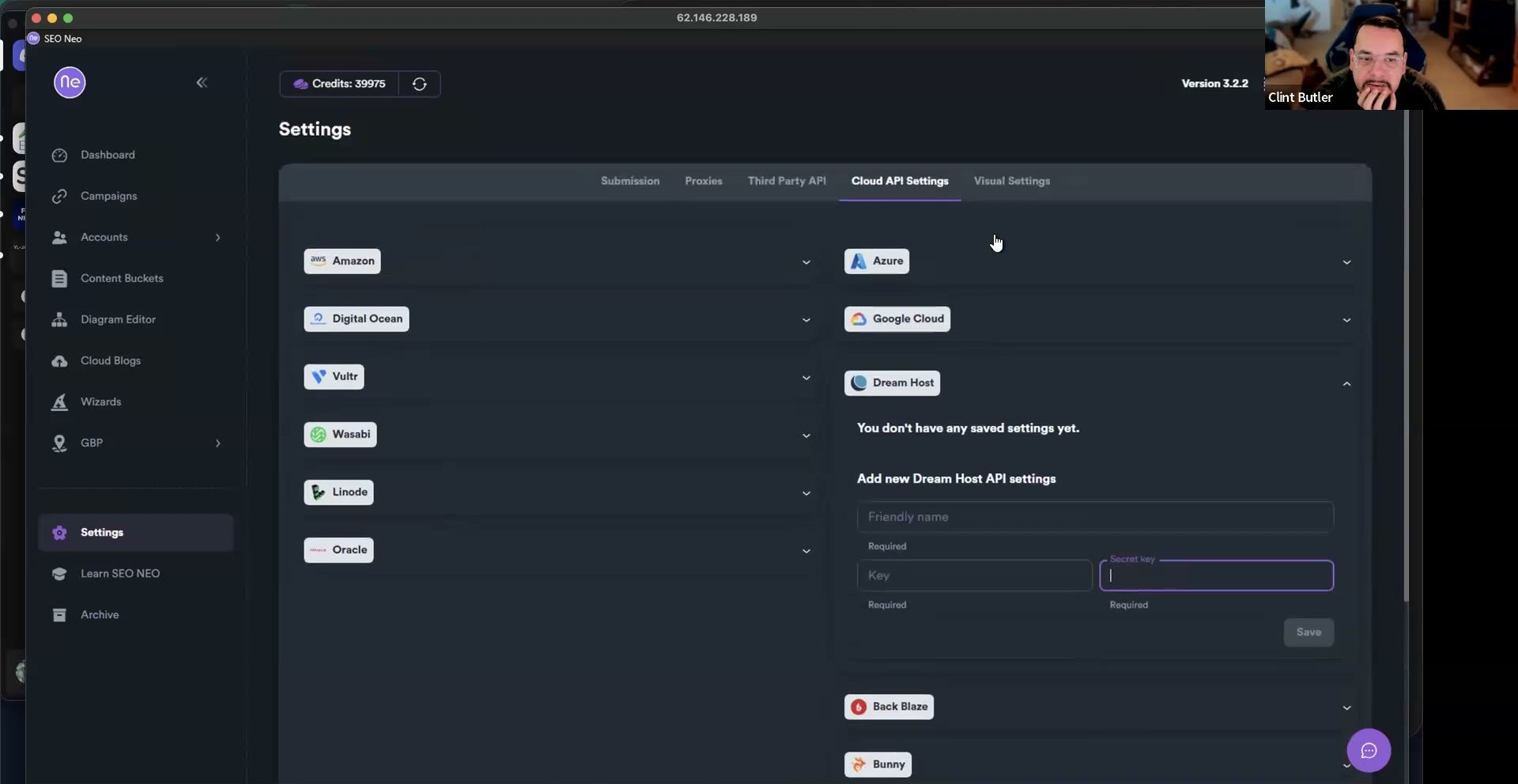 The provider list that powers the "1 cloud blog = N sites" math — AWS, Digital Ocean, Vultr, Wasabi, Linode, Oracle, Azure, Google Cloud, Dream Host, Back Blaze, Bunny. Each row wants Friendly name + Key + Secret key; "You don't have any saved settings yet" means start filling them in.
How: 1. NEO → Settings → Cloud API Settings. 2. For each provider, fetch API key + secret (Elias has per-provider setup videos). 3. Skip Wasabi. Skip Oracle. They don't work for Clint and aren't worth troubleshooting. 4. Fill out the rest. 5. Save every credential in a password manager outside NEO.
Math: 25 cloud blogs × ~12 providers = ~300 sites per client folder (request an Amazon bucket-cap increase if you go big).
2. Spin Rewriter
What: How aggressively NEO swaps synonyms when spinning.
Why: Default turns one article into 1,000 garbage variants. HIGH produces ~50 unique high-quality variants — the line between "a human wrote this" and "obviously spun."
How: NEO → Generate → OpenAI / Default Prompt → Spin Rewriter. Set synonyms → HIGH, both related-words dropdowns → HIGH. Save.
On screen (Session 1): the spinner dropdown offers Don't Spin, Free Spinner, Spin Rewriter, Word AI, Spinner Chief, ESpinner — Spin Rewriter is Clint's pick. Every unconfigured spinner shows "Add Missing Spinner Credentials" beside it. The GPT model on that build read GPT-5.
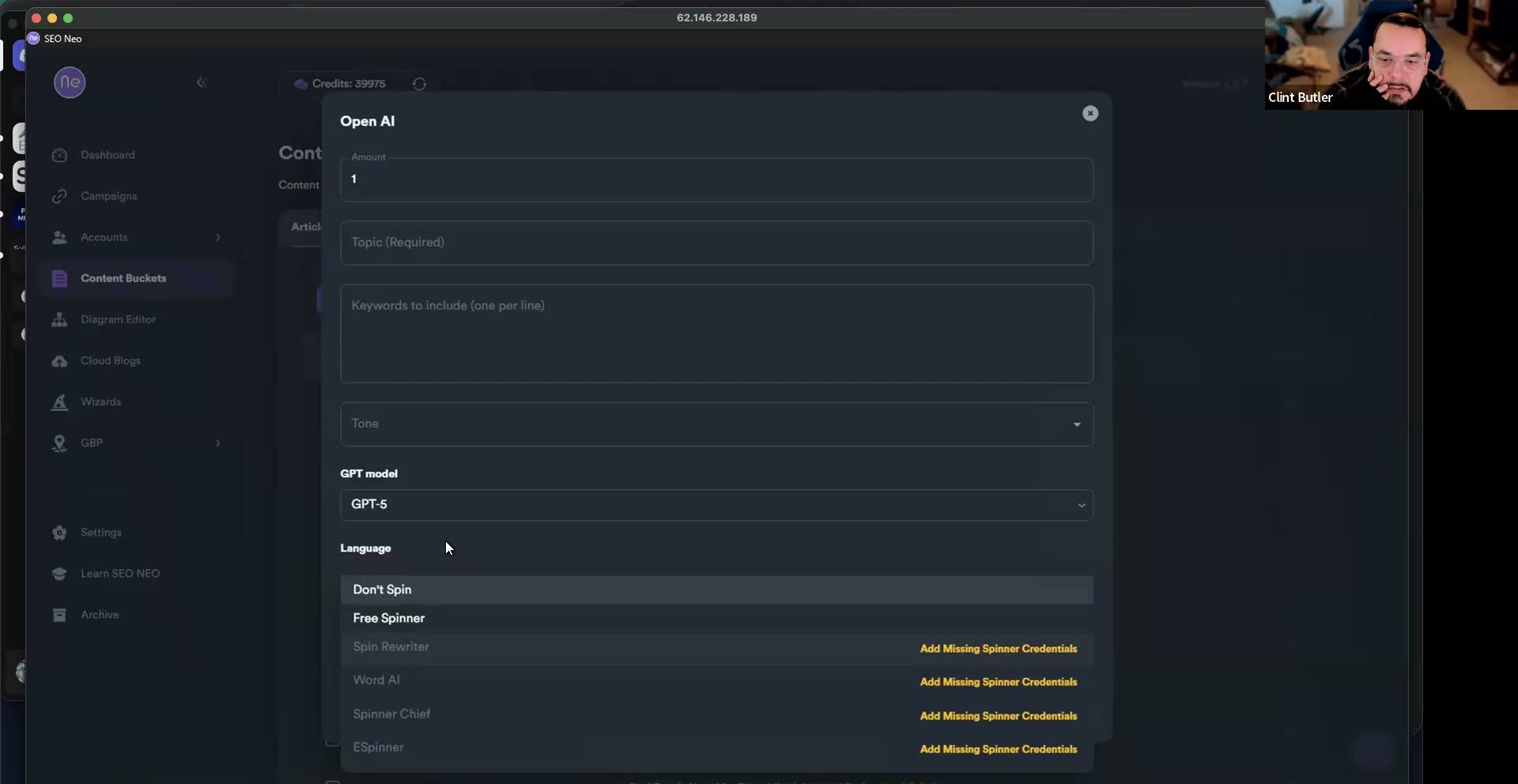 The Article Builder's OpenAI generate dialog: GPT model reads GPT-5, and the open spinner dropdown lists Don't Spin, Free Spinner, Spin Rewriter, Word AI, Spinner Chief, ESpinner. Only the spinner you've added credentials for runs — the rest show "Add Missing Spinner Credentials."
Critical: articles made with default settings cannot be retroactively spun. Set this BEFORE making content.
3. Default bio template
What: Author bio on every cloud blog.
How: Cloud blog → Default Bio → Edit My Bio → copy the SpinTax template → paste into ChatGPT: "I'm writing blog posts for [niche]. Rewrite this bio for that niche; keep the SpinTax syntax intact." Drop it back in. Save a copy externally.
What the SpinTax looks like (on screen, Session 1): the default bio carries nested SpinTax like Long Beach (owners|house owners|homeowners|householders|property owners|home owners) (accept as true with|agree with|believe|consider|trust...). That is the syntax ChatGPT must preserve. The OpenAI auto-generated bio is usable but weaker than the rewritten "My Bio."
4. Default blog details (names + subdomains)
What: The pool of blog names + subdomain strings NEO uses.
Why: Greg Morrison's Reverse Sink-or-Swim — keyword in the page title AND the URL. The blog-name field bleeds the keyword into the subdomain.
How: Blog Details → grab the name + subdomain templates → ChatGPT: "Using the same SpinTax structure, give me 50 unique blog names and 50 matching subdomains." Drop the packs back in.
On screen (Session 1): the Blog Details title template read like {Local|The Best} {West Hollywood...} — the same SpinTax pattern you hand ChatGPT to preserve.
5. NAP block
What: Name/address/phone on every cloud blog contact page.
How: Format with HTML paragraph tags + <br> breaks (plain text renders as a blob across the 12 providers). Preview to confirm separated lines. Untested but worth trying: drop JSON-LD schema in too — the field accepts HTML.
Worked example (on screen, Session 1): the Edit NAP / Blurb field for Adam's Pool and Spa held literal HTML —
Adam's Pool and Spa Service<br>
910 E 72nd St, Long Beach, CA 90805<br>
(562) 522-2203<br>
https://adamspoolandspa.com/<br>
<iframe src="https://www.google.com/maps/embed?..." width="600" height="450" style="border:0;" allowfullscreen="" loading="lazy" referrerpolicy="no-referrer-when-downgrade"></iframe>
The live Content Preview rendered the embedded Google Map plus a "5.0 (32)" rating card. Per-line toggles available: Don't Translate / Don't Spin and "Position in article: bottom."
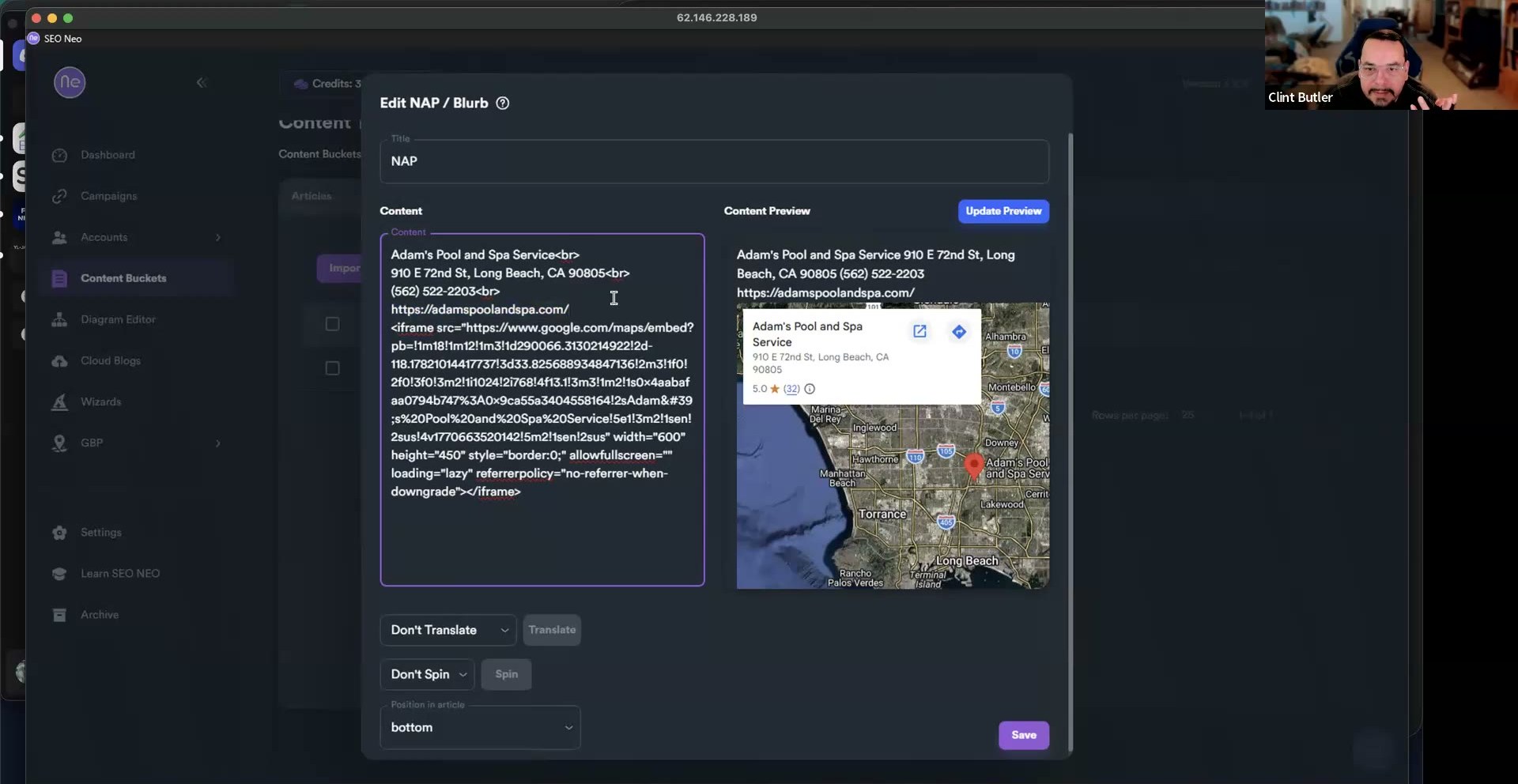 The NAP block as HTML (name, address, phone, URL with
 <br> breaks, plus a Google Maps <iframe>) renders into a clean map + "5.0 (32)" rating card in the live preview. Set the per-line toggles to Don't Translate / Don't Spin and position it at the bottom of the article.
6. Blog comments pool
What: Spun comments GBP Blast cycles through.
How: Generate ~100 comments via NEO's generator (spinning is HIGH from step 2). Save. Enough variety to run for months without repetition flags.