"Ben Fisher: Protecting Your Google Business Profile (Suspensions, Moves, and Reinstatement)"
Ben Fisher of Steady Demand on why Google Business Profiles get suspended, how to move a location safely, and the evidence kit that gets a listing reinstated fast.
On this page
- Main takeaways
- Key points
- Speaker background
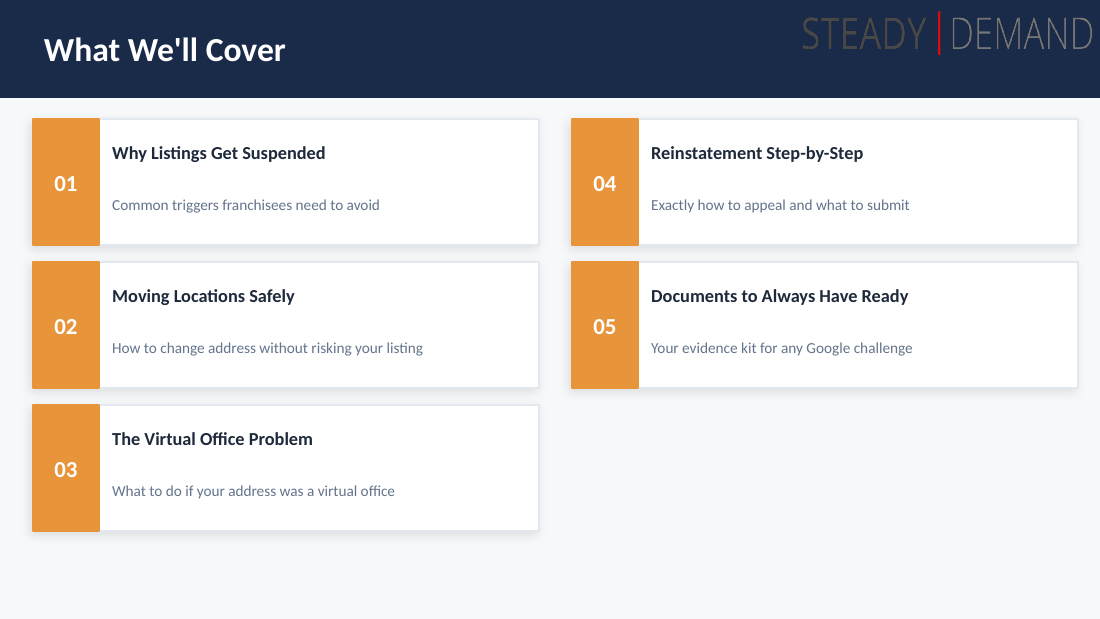
- Why listings get suspended
- Numbers and named facts
- Moving a location
- The appeal and reinstatement process
- PII and video verification
- Documents to always have ready ("body of evidence")
- Doctored documents
- Agency accounts, emails, and portfolio protection
- Agency dashboard (Q&A with Terry)
- Branded email versus Gmail (Q&A with Terry)
- Self-removal as a manager (Q&A)
- Slides
- Source
On Day 3, Ben Fisher of Steady Demand delivered a practical walkthrough of keeping a Google Business Profile (GBP) alive: why listings get suspended, how to move a location without losing it, the danger of virtual office addresses, a step-by-step reinstatement process, and the standing "evidence kit" every business should keep on hand before trouble strikes. His core message is that suspensions are survivable and often resolved within 24 hours, but only when the documentation is ready in advance. Terry hosted, introduced Ben, and ran a giveaway during the session.
Main takeaways
-
Only 4% of businesses are ready with documentation when suspended, and that number has not moved in 5-6 years. Across close to 10,000 reinstatements, Steady Demand consistently finds only 4 in 100 businesses have their licenses, bills, and registrations ready. Being unprepared turns a 24-72 hour outage into one lasting months, because some documents (like a utility bill) require a full statement cycle of at least 15 days to obtain.
-
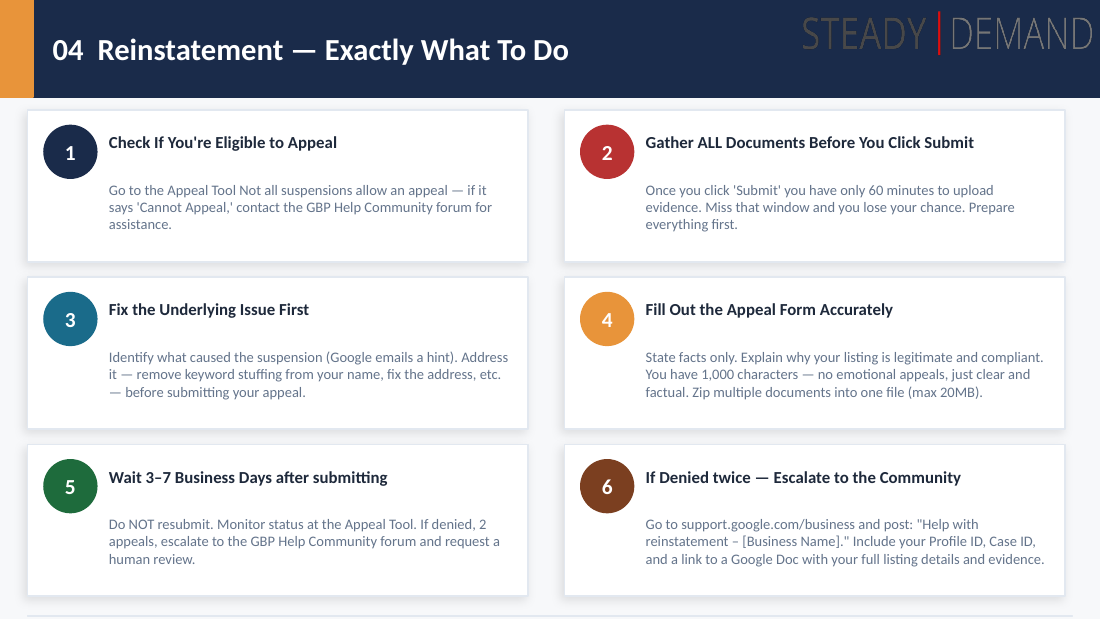
The newer appeal tool gives you only 60 minutes to upload evidence once you start. Miss the window and you get denied, then must go through a secondary appeal. The fix is to gather and zip all documents before clicking Submit.
-
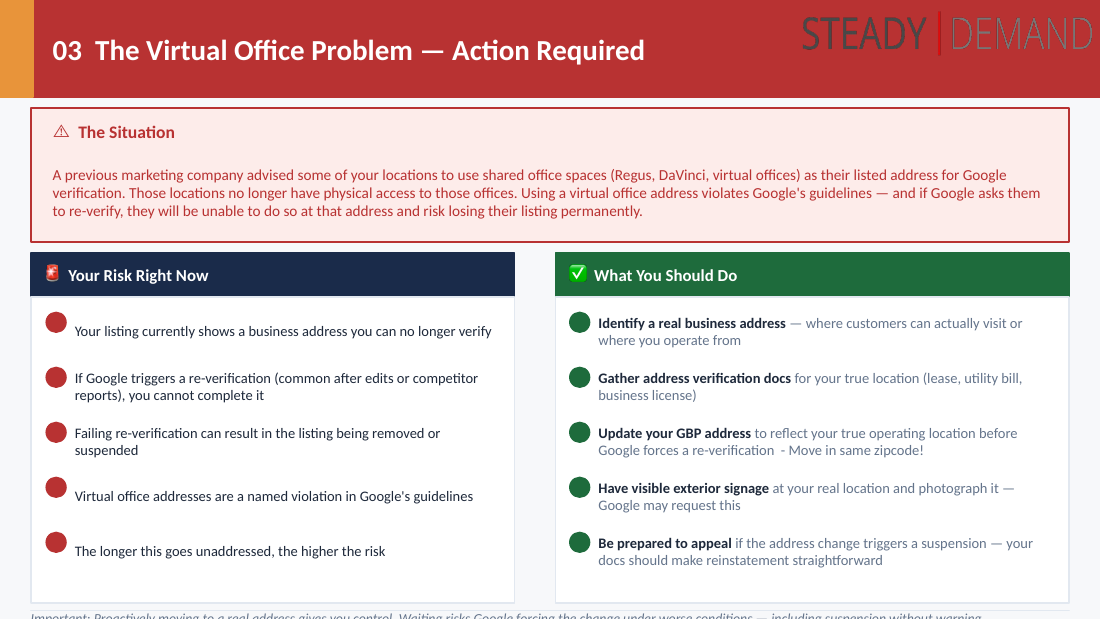
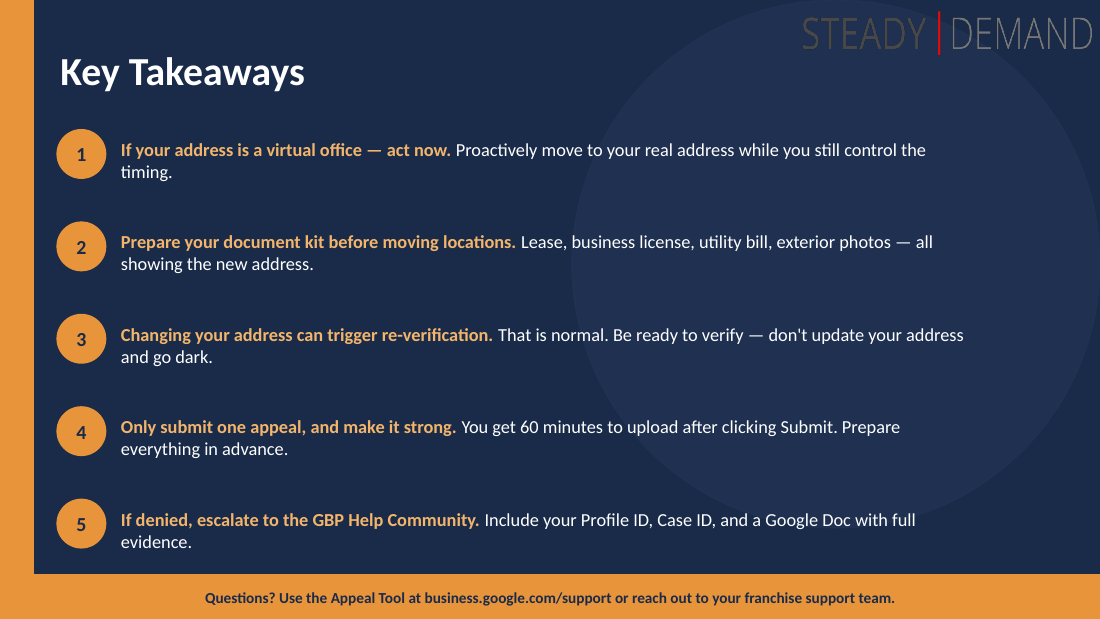
Virtual offices (Regus, DaVinci, UPS Store) are a named guideline violation and a top suspension trigger. "Everyone else is doing it" is not a defense. If a client is in a virtual office, start the move process now rather than waiting for the inevitable suspension.
-
Move locations within the same zip code to avoid verification. A move inside the same exact zip code typically skips verification and carries very low suspension risk. Changing the zip code is a different story. Before moving, update Secretary of State, BBB, and citations so Google trusts the move.
-
PII (a human face) in a verification video triggers an immediate stop and denial or suspension. Google will not watch anything showing personally identifiable information; a face reflected in a glass door is enough. License plates, oddly, are acceptable and even encouraged because they help confirm location.
-
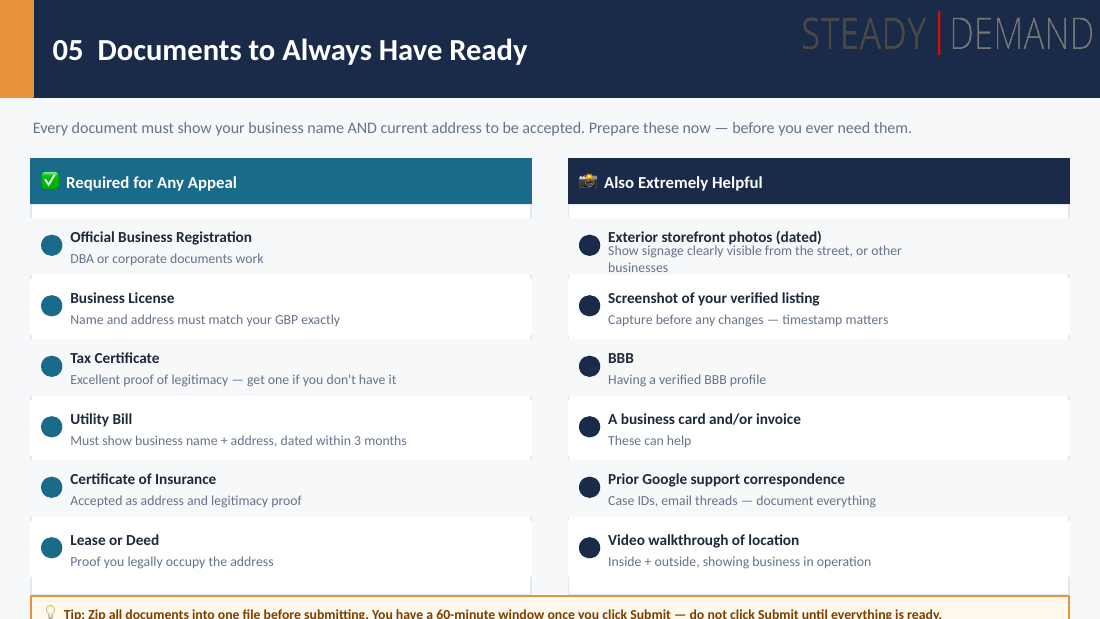
Keep a standing "body of evidence." Business registration, business license, tax certificate (a "silver bullet"), utility or cell phone bill in the company name, certificate of insurance, lease or deed, BBB profile, exterior signage photos, and a location video walkthrough. Google evaluates documents together as a body of evidence per entity.
-
Use an agency account with a clean email to protect a portfolio. One bad-actor email, or an Ads or Workspace violation tied to a profile, can cascade and suspend an entire network of listings. An agency account itself gives no extra authority, but a domain on Google Workspace does pass trust into the dashboard.
-
Do not panic, do not spam Google support, and do not file duplicate appeals. Multiple appeals clog the system and Google keeps the original case. After submitting, be patient. If denied at secondary appeal, escalate to the GBP Help Community with only your Profile ID and Case ID (never personal information).
Key points
Speaker background
- Digital marketing and internet work since 1996; found his focus in Google Business Profiles and local businesses (and agencies) in 2013.
- Company: Steady Demand (SteadyDemand.com). Helps customers maintain and protect GBPs, Local Services Ads, and AI work.
- Says he wrote the official agency-account guide and video on support.google.com/agency.
- Contact (from deck): SteadyDemand.com, linkedin.com/benfishertechpad, Twitter.com/SocialDude.
- Mentioned an upcoming Local U presentation in October on "GBP horror stories" (not yet given).
Why listings get suspended
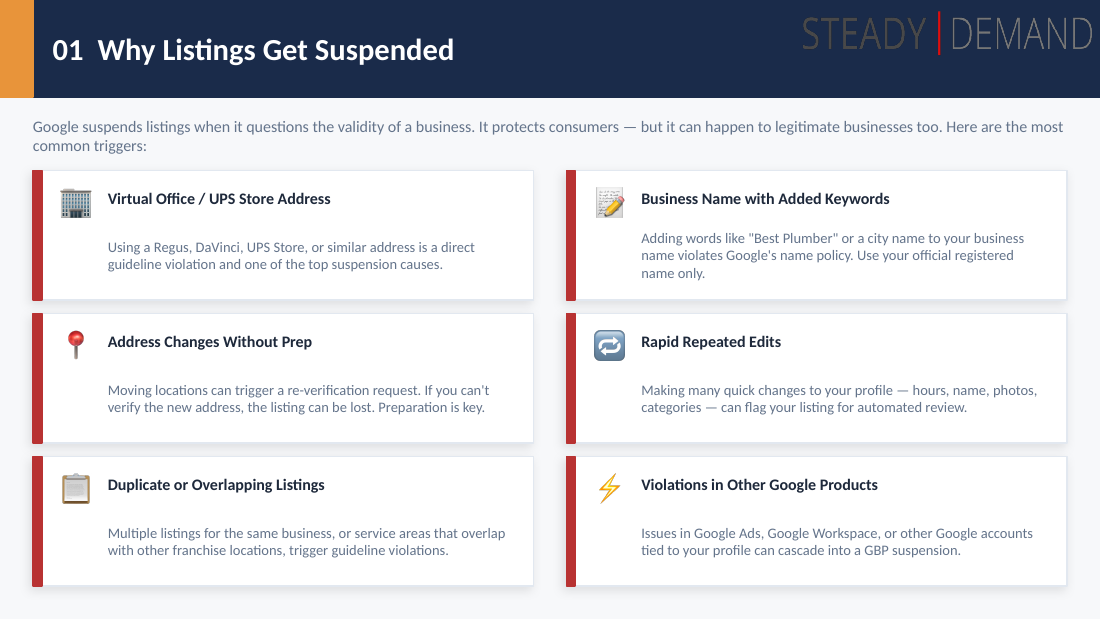
- Virtual offices (Regus, DaVinci, UPS Store) are a direct, named guideline violation and a top trigger.
- Address changes without prep frequently trigger suspension via re-verification.
- Duplicate or overlapping listings will always cause a suspension and are the hardest to deal with.
- Keywords in the business name (for example "Best Plumber" or a city name) cause retargeting and removal; use the official registered name only.
- Rapid edits trigger an "integrity check." Rule of thumb: only move to the next edit once the previous one has been accepted; if not accepted, wait.
- Violations in other Google products (Google Ads, Workspace) tied to a profile email cascade into GBP suspensions. This type usually reinstates quickly once the offending email is removed, if nothing else is wrong.
Numbers and named facts
- 4% of businesses are ready with documentation to get reinstated quickly; that figure has held steady for 5-6 years.
- Steady Demand has done close to 10,000 reinstatements.
- 60 minutes: the documentation upload window once you start a submission in the newer appeal tool (released about a year to a year-and-a-half ago).
- Utility bill turnaround: must wait an entire statement cycle, minimum about 15 days.
- When prepared, clients are typically back online within 24 hours; unprepared cases stretch to months.
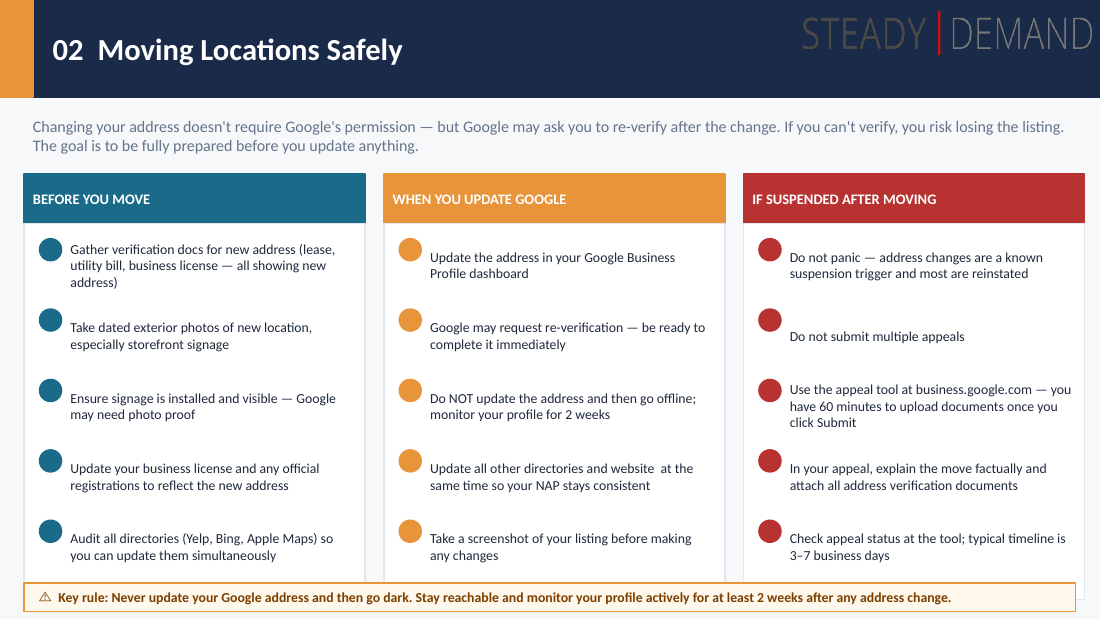
- Deck timeline figures: 3-7 business days typical appeal wait; appeal zip file max 20MB; appeal form 1,000 characters; utility bill dated within 3 months.
- Agency dashboard approval: usually within 72 hours.
- Giveaway: SEO the Board Game by Kyle Rudy, given to Randy (first ticket buyer for next year). Only 25 copies, "half gone already."
Moving a location
- Google is "nothing but a data engine / data repository"; ask why you are moving.
- Same exact zip code move = no verification required, suspension chance "extremely tiny." A common path for clients leaving a Regus for a real office.
- Change the zip code and it is "a different story."
- Before moving: gather evidence; update Secretary of State, Better Business Bureau, and run a citation update so Google gains confidence in the move.
- A move may go into verification; that is normal, just complete the video verification.
- Have signage installed before verifying. Do not verify 30 days early because "we're opening in 30 days"; you will get suspended because signage is not ready.
The appeal and reinstatement process
- First read the guidelines (they are "gray" but give direction on what is OK versus not).
- Confirm you are eligible to appeal; fix the underlying violation before appealing.
- Gather and zip all documents before clicking Submit (60-minute clock).
- After submitting, be patient; do not continually email Google Support.
- Myth: contacting support too many times sends you to "the back of the line." Reality: it does not literally, but it clogs the system and Google shuts down the new case to keep the original. A second appeal from the same email returns: "You already have a line of email communication. Please use that existing thread."
- Bad Google messaging example: an email says "you have not been approved, and we may ask you to do some video verification," but they never actually ask. If you get it, click the blue link and visit the profile; verifications are often already reinstated.
- If denied at secondary appeal: go to the Google Business Profile community (support.google.com/business). Provide ONLY the Business Profile ID and the Case ID. Do not post any personal information; the experts (Ben, "Julie") will halt until it is removed. They escalate to the trust and safety team. No response in 2 weeks = denied; make a new case.
PII and video verification
- Google rule: PII = personally identifiable information; a person's face counts.
- Google will not look at anything that identifies a person; a face reflected in a glass door stops the review, resulting in suspension or denial.
- License plates are acceptable and encouraged (not treated as PII); they help Google confirm location.
- Ben always has clients do a video walkthrough (inside and outside, signage, entrance, locked employee-only area) and "pre-shops" it so he can see what they will show Google.
Documents to always have ready ("body of evidence")
- Official business registration (DBA or corporate docs).
- Business license; name and address must match GBP exactly.
- Tax certificate with the city; described as a "silver bullet."
- Utility bill in company name. If the lease includes internet, a cell phone bill in the company name works ("costs a little more, worth it").
- Certificate of insurance; always works.
- Lease (or deed); mostly works; proof you legally occupy the address.
- Exterior signage photos (dated).
- Verified-listing screenshot; the weakest piece of evidence, but builds a slightly better case.
- Better Business Bureau accredited or verified profile; Google once required it during verification (now removed) but still weights it slightly.
- Business card and invoices; help a little, especially for service-area businesses.
- Google evaluates everything together as a body of evidence per entity.
Doctored documents
- Google can detect doctored documents; people go to Fiverr to get docs made, and Google can see it.
- Running a document through AI tools can also uncover that it was edited.
- Gaming the system only affects the entity unless there is large-scale abuse.
- Horror story: a personal-injury brand with 25 virtual offices used the exact same sign on every door; Steady Demand made a GIF for the product experts. Google blacklisted the entire brand, and they had to rebuild the company (name, all documents, all signage).
Agency accounts, emails, and portfolio protection
- One bad-actor email tied to a profile can suspend an entire network when Google "connects the dots."
- Google guidelines: use only an email authorized around the profile; Google dislikes random Gmail addresses on every profile, a known bad-actor technique.
- To protect a large portfolio: use an agency account with a clean email; keep anything close to gray hat out of it.
- Use sock puppet (disposable) accounts for risky activity like bulk or un-vetted suggested edits, not the main account.
- Whoever manages AdWords should use an address NOT inside the GBP or agency dashboard.
- Trust rule: you must trust anyone tied to a GBP 100%. A "very big listings provider" had one email cause suspension of 1,000 accounts; removing that email reinstated them in 24 hours.
- Even as a manager (not owner), an added user breaking guidelines can suspend everything in the account by association; you do not get it back until the offending party is removed.
Agency dashboard (Q&A with Terry)
- URL referenced: business.google.com/agency (subscribe and setup). Ben authored the support.google.com/agency guide.
- Purpose: organize all GBPs in one place, granular per-profile control, easy add and remove of users, client folders, and request-access-via-invitation.
- Apply and get approved usually within 72 hours.
- Caveat: email accounts added to the agency dashboard must be EMPTY (no GBPs already associated), or it throws an error.
- Does an agency dashboard give more authority in Google's eyes? A resounding no. But if the domain is on Workspace, that authority flows into the dashboard and protects the GBPs.
Branded email versus Gmail (Q&A with Terry)
- Reinstating through a branded email (for example @steadydemand.com) gives better results than @gmail.
- "It depends": a very old, internally Google-trusted Gmail lowers suspension chances and raises auto-verification odds.
- Best experience: an old Workspace account.
Self-removal as a manager (Q&A)
- A manager can remove themselves: go to Users, find your user, click the edit pencil, remove yourself. Managers do not see the "remove this entire profile" message.
Slides
Slides (9)
Source
Synthesized from the Day 3 conference recording of Ben Fisher's session and the accompanying deck (gbp-guide-v2-1, "Protecting Your Google Business Profile Listing," Ben Fisher / Steady Demand). The moderator name "Terry" comes from the session notes and is not stated verbatim in the recording.