GBP Blast + Sniper
The maps levers — push the GBP pin to the 3-pack and generate phone calls.
On this page
GBP Blast + Sniper are the only map levers in NEO. Goal: push the client's Google Business Profile pin to top-3 ("map pack") for high-intent commercial keywords. Phone calls follow. The weekly quickstart is the condensed loop; this is the full reference.
Step 1 — Rerun the grids (weekly)
Open each client's GBP grid in NEO, hit Rerun (costs credits, accept it).
- Without recent grid data, NEO's programmatic targeting is blind — it sends links where they're no longer needed.
- With it, NEO auto-pushes links toward weak pins (ignores your #1s, focuses the #10s).
- Don't trust the color legend. Click in for the real number — a "5" can show green and not be 3-pack.
Weekly for active push; monthly minimum for maintenance.
Read the live stat, not the colours. A real grid run for JA Headshots' "LinkedIn Headshots" showed 3-PACK 10% / 4-10 RANK 0% / 11-20 RANK 90% over the Fort Myers FL area — i.e. the pin is buried in the 11-20 band almost everywhere, which is exactly the weak keyword you blast next:
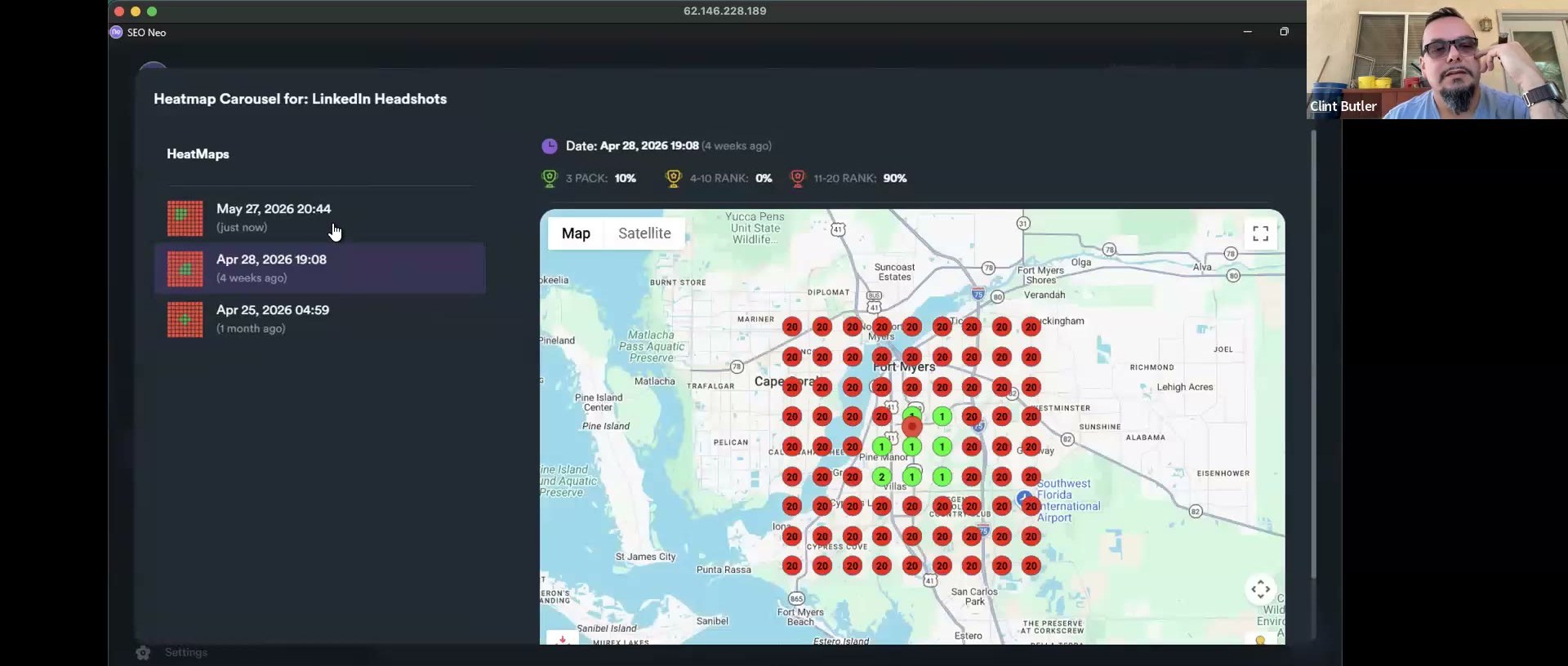 Heatmap Carousel for "LinkedIn Headshots": 3-PACK 10% / 4-10 RANK 0% / 11-20 RANK 90% over Fort Myers FL. The mostly-red grid is the buyer-demand keyword to point a single-keyword Blast at.
Step 2 — Pick the weak keywords
Flag the red keywords that also have real buyer demand. "LinkedIn headshots" → yes. "Team headshots" → no (companies hire their own photographers), even if it's red. Prioritize 3–4 to rotate.
Step 3 — Single-keyword GBP Blast
NEO → Wizards → GBP Blast → your client's GBP → one keyword as the primary anchor (just "LinkedIn headshots," not "near me," not variations). Run.
The wizard's left rail walks Content Buckets → Keyword and Heatmap selection → Campaign settings, with a Select a Project step up front. On Joshua's run the project resolved to JA Headshots (26.58058, -81.85437), and the heatmap you push to is a Grid 9×9 [2.5 km spacing] (a 9×9 measurement grid, 2.5 km between points). (NEO version on that build: 3.2.8.)
![SEO Neo Wizards — the "Select a heatmap to create directional URLs" step of the GBP Blast, project JA Headshots (26.58058, -81.85437), each option a Grid 9×9 [2.5 km] heatmap, with the selected grid and its 3-pack / 4-10 / 11-20 stat band](./assets/seoneo/seoneo-gbp-blast-grid.jpg) Picking the heatmap/grid for the GBP Blast (SEO Neo Wizards). Each grid is 9×9 at 2.5 km spacing; the stat band (3-PACK / 4-10 / 11-20) is how you read map strength before pointing a single-keyword Blast at the weak grid. SEO Neo 3.2.8.
Picking the heatmap/grid for the GBP Blast (SEO Neo Wizards). Each grid is 9×9 at 2.5 km spacing; the stat band (3-PACK / 4-10 / 11-20) is how you read map strength before pointing a single-keyword Blast at the weak grid. SEO Neo 3.2.8.
Why one keyword: the map is the only place you can get away with concentrated single-keyword anchor pressure. The same on your money site would over-optimize and tank you.
Step 4 — Rotate weekly
- Wk1: "LinkedIn headshots" · Wk2: "Professional headshots" · Wk3: "Commercial photography"
- Wk4: rerun grids; if a previously-good keyword slipped, add it as a fourth and rotate it in.
~4 blasts/month, all sharing the core noun ("headshots") plus niche differentiation = diversity-with-coherence. NEO's programmatic targeting pushes to your weakest pin; all-1s pins are ignored (already won).
GBP Sniper
Companion to Blast, different mechanism. Run it alongside Blast on the same weekly cadence while in active push.
Maintenance mode
When grids show consistent top-3, drop to monthly Blast + Sniper. Stop for 3+ months and the backlinks roll off and rankings fade — so bake a monthly freshness blast into the SOP for every client. See Monthly cadence.
Coverage refinements
- One map per city, not one giant map. A Phoenix map will never rank you in Scottsdale even though they're adjacent — make a separate Scottsdale map. A single grid eventually stops giving more; spreading to a neighbor city is the next move.
- Leave near-perfect grids alone. All 1s except one corner at #4 → don't keep working it; once-a-month maintenance blast. WordPress city/neighborhood tags + a little service-area schema help a bit, but only a bit.